Windows 8 Basics
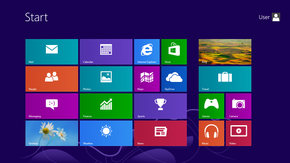
Windows 8 introduces significant changes to the operating system's platform, primarily, featuring a new Start screen with a grid of dynamically updating tiles that represent applications.
The Start screen replaces the "Start menu" of earlier Windows versions.
I, personally, like the change and found it easy to transition from the previous Windows programs.
Must Know Tips
The hottest quick-key short cuts.
- Press the Windows Key, (located at the bottom your your keyboard) to toggle back and forth between the familiar desktop screen and the new tiled start screen.
- The Windows key + E opens Explorer for quick access to folders.
- The Windows key + X to get to the Quick Access Menu.
- The Windows key + Z opens All Apps.
Customize your tiles

- Move any tile by clicking and dragging the tile.
- Use your mouse wheel to scroll left-to-right through your tiles.
- Any desktop shortcut or program can be pinned to the Start screen by right-clicking the icon and choosing Pin to Start.
- If there is a tile you want on your Taskbar, right-click the tile and choose Pin to taskbar.

